

Basic Settings
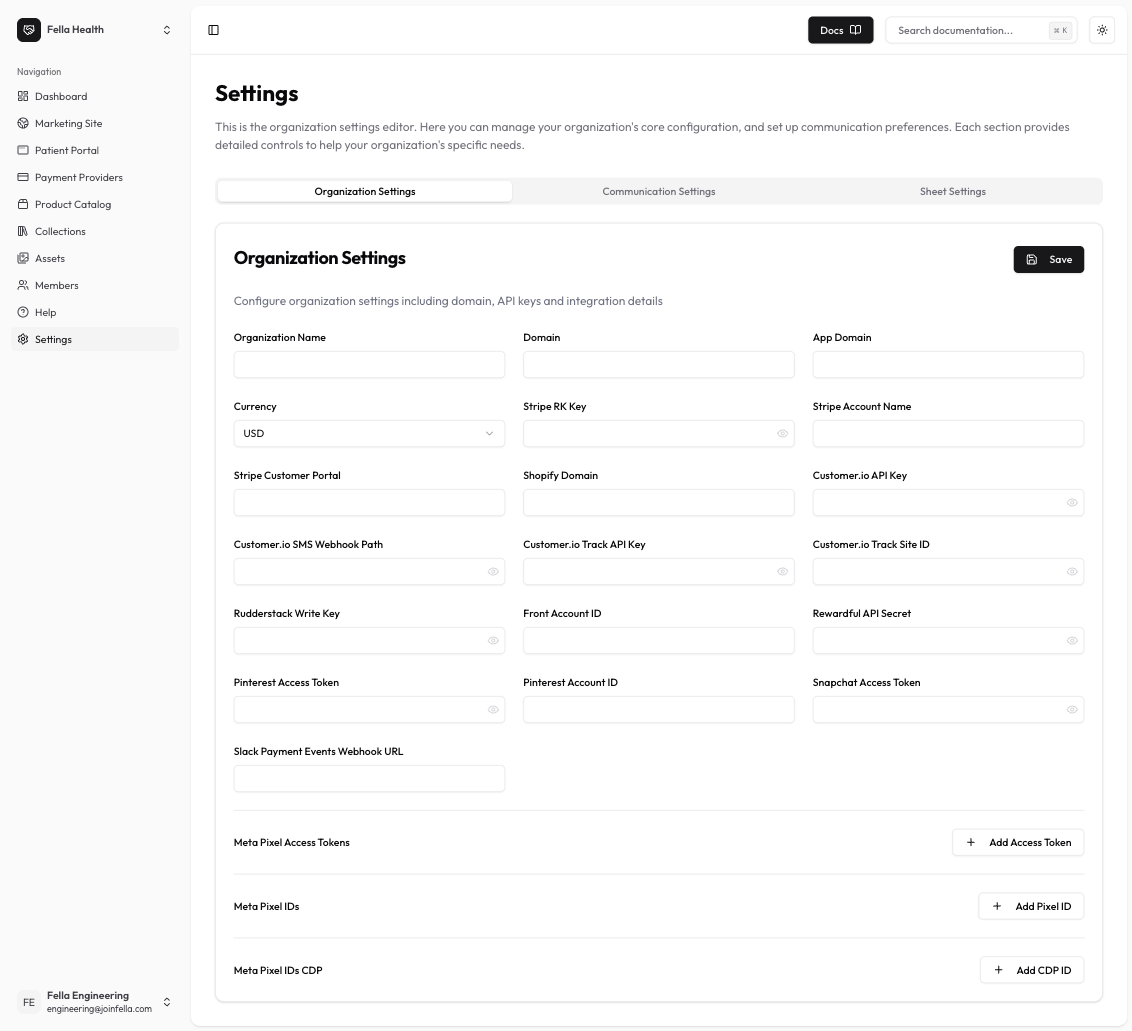
- Organization Name: Your organization’s display name
- Domain: Primary domain for your organization
- App Domain: Domain used for your patient portal
- Currency: Default currency for transactions
Stripe Integration
- Account Name: Your Stripe account name
- Customer Portal URL: URL for the Stripe customer portal
- Restricted Key: Your Stripe restricted key
- Slack Payment Events Webhook: Webhook URL for payment event notifications
Meta (Facebook) Pixel
- Access Token: Meta Pixel access token
- Pixel IDs: List of Meta Pixel IDs to track
- CDP Access Token: Customer Data Platform access token
Customer.io Integration
- API Key: Customer.io API key
- SMS Webhook Path: Webhook path for SMS notifications
- Track API Key: API key for tracking events
- Track Site ID: Site ID for tracking
Additional Integrations
- Front Account ID: Your Front customer service platform ID
- Pinterest Settings:
- Access Token
- Add Account ID
- Rewardful API Secret: Secret key for referral tracking
- Rudderstack Write Key: Key for analytics integration
- Snapchat Access Token: Token for Snapchat advertising
Next Steps
After configuring your organization settings:- Test your integrations
- Set up tracking and analytics
- Configure your payment processing
- Customize your customer communications